
How to access Bitnob Enterprise
Bitnob Enterprise is not a separate product signup, it is available to you automatically once you have a Bitnob account with a completed company setup.
Prerequisites
Before you can access Bitnob Enterprise, make sure the following are done on your account:
Company set up — Your company profile (name, address, business type) must be completed
2FA Authentication enabled — Required for account security before accessing the platform
You can check the status of both from your account home page under System Recommended Checklist.
Accessing Bitnob Enterprise
Log in to your Bitnob account at accounts.bitnob.com
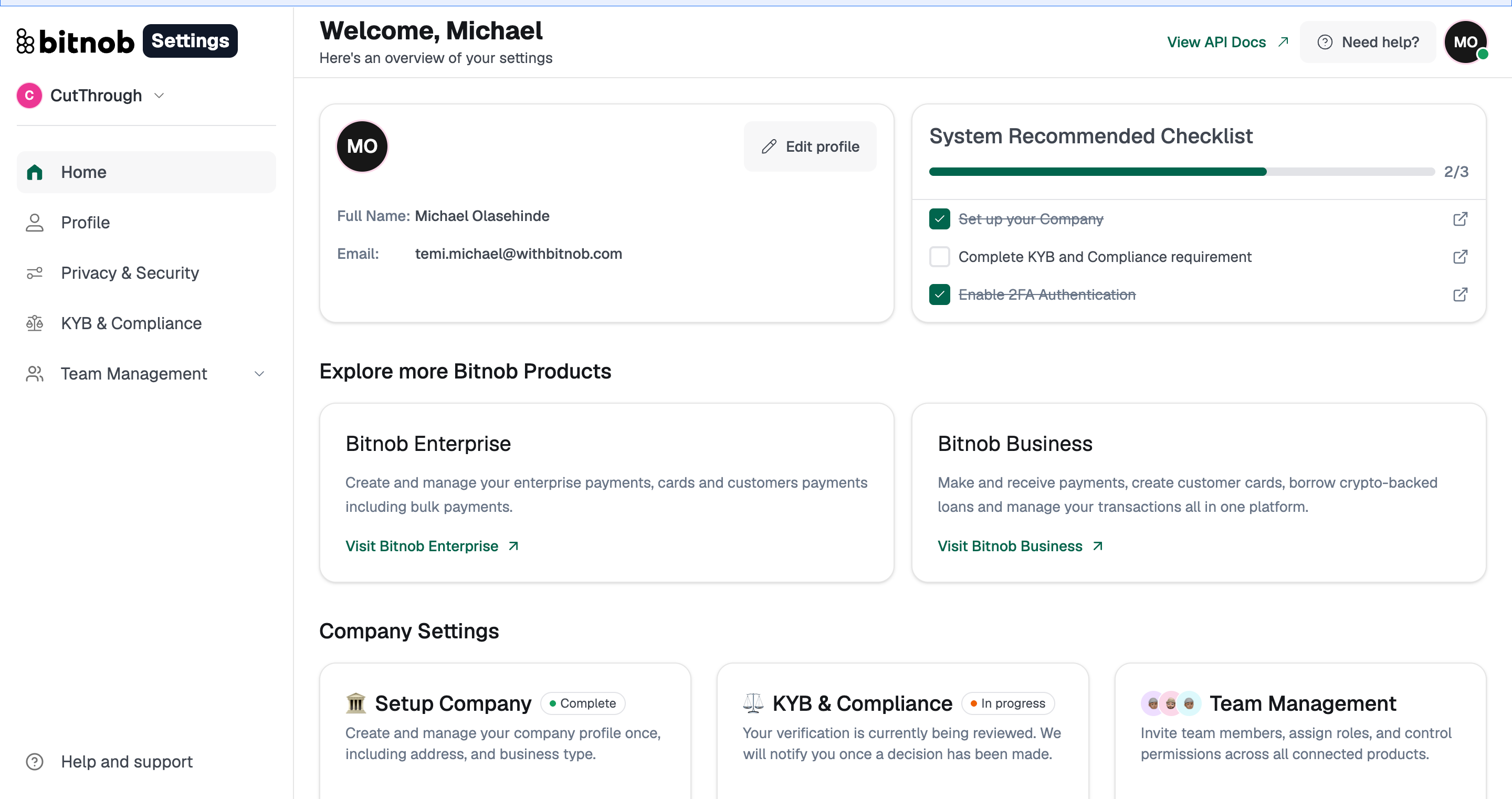
On your home page, scroll to the Explore more Bitnob Products section
Locate the Bitnob Enterprise card
Click Visit Bitnob Enterprise
You will be taken directly into the Bitnob Enterprise platform, no additional signup or application is required.
Note: If your company setup is not yet complete, you will see it flagged in the System Recommended Checklist on your home page. Complete it before accessing Enterprise to avoid any restrictions.
Related Articles